
Workspace layouts
Save and restore arrangements of panels and Canvas widgets.
Ruwa automatically remembers the current workspace arrangement. Named layouts provide reusable snapshots that you can switch between or transfer to another installation.
Layouts do not change the artwork
Applying a layout changes only the editor workspace. It does not modify layers, project pixels, or the exported image.
What a layout contains
A workspace layout stores:
- the position, size, and visibility of panels;
- whether panels are docked or floating;
- panel behavior such as Movable, Dockable, and Resizable;
- the visibility and position of Canvas widgets;
- the order of the Joystick and its zoom panel.
See Panels and Canvas widgets for the controls represented by these settings.
Automatic workspace memory and named layouts
Ruwa remembers your current arrangement on its own, so moving a panel today means it's still there tomorrow. Named layouts are for something else.
A named layout is a snapshot you can come back to. Save one when you've got an arrangement worth keeping, want to flip between workflows, or want to hand your setup to someone else. Rearranging things afterwards leaves the saved layout alone.
Open the Layouts popup
Select Workspace layout near the window controls in the top bar.
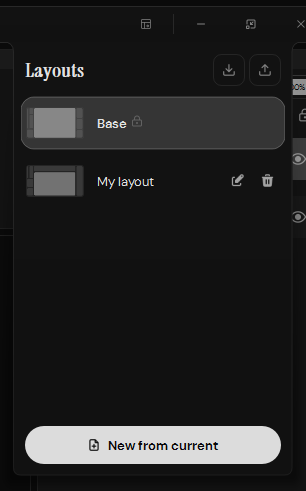
Layout previews show the panel arrangement before you apply it.
Select a layout to apply it to the active project tab. Base is the built-in standard Ruwa arrangement. It is locked, so it cannot be renamed or deleted.
Create and manage a custom layout
To capture the current workspace:
- Arrange the panels and Canvas widgets as needed.
- Open the Layouts popup.
- Select New from current.
Ruwa adds a custom preset named My layout. Use the edit control to give it a descriptive name. Custom layouts can also be deleted with the trash control after confirming the action.
Creating a new preset captures the active arrangement as another snapshot; it does not replace an existing custom layout.
Import and export layouts
Use the controls at the top of the Layouts popup to exchange layout files:
- Export writes the current arrangement of the active project tab to a
.jsonfile. It exports the live workspace, not the selected preset in the list. - Import adds a
.jsonlayout as a custom preset and immediately applies it to the active project tab. Ruwa gives the imported preset a unique name if another layout already uses its name.
Creating, importing, and exporting layouts requires an open project tab.